We're introducing a new version of OXU Developer Portal, designed to make application development and integration simpler and more intuitive.
With a refreshed interface, streamlined navigation, and goal-based integration journeys, you can focus on what you want to achieve without having to figure out where to start.
The new Developer Portal will replace the current experience when it becomes available.
Release date: November 5, 2026
What's new in Developer Portal V2?
1. Start with what you want to build
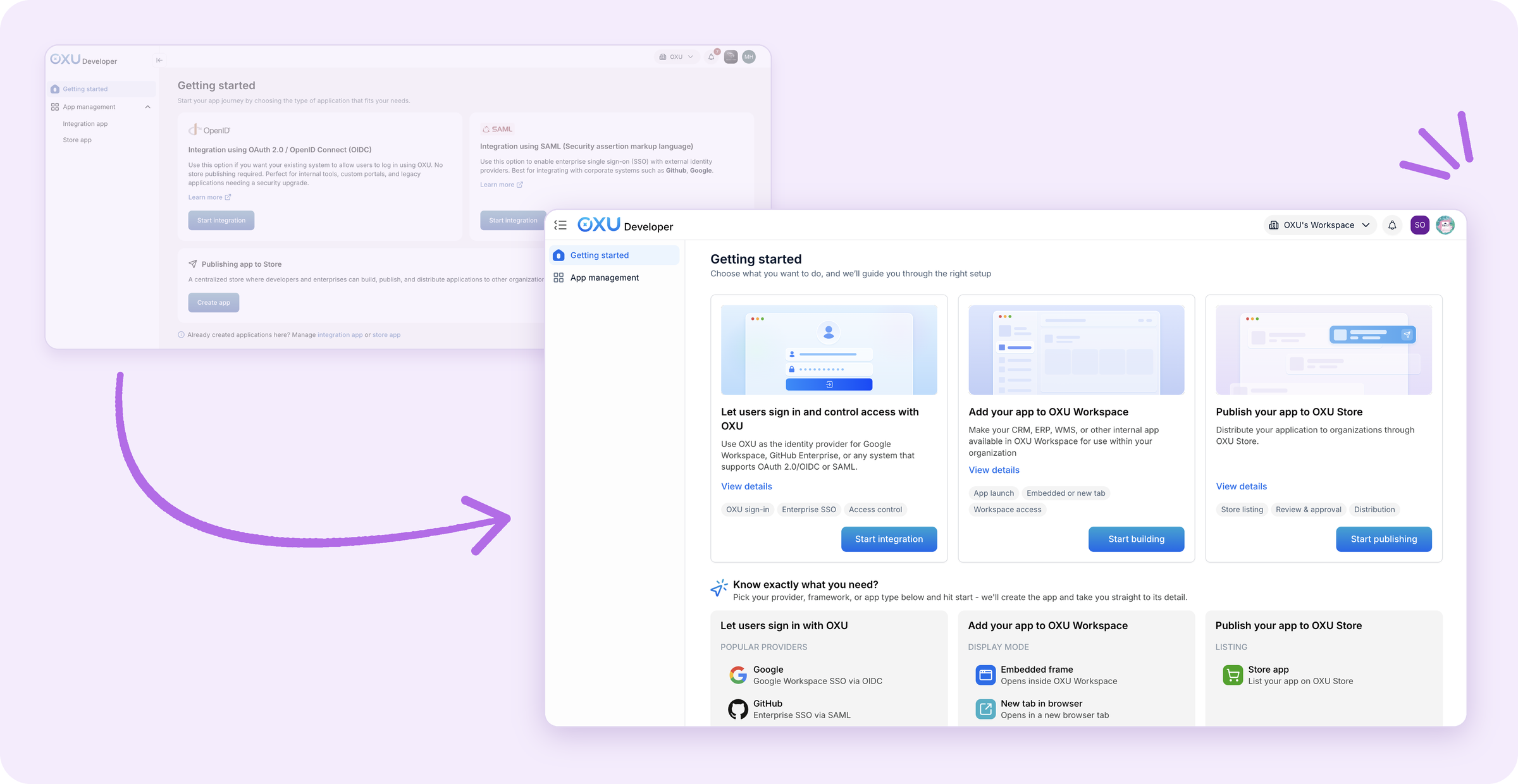
Instead of choosing a technical protocol or application type upfront, you can now start by selecting your integration goal.
The redesigned Getting started page introduces three main journeys:
| Integration journey | What you can do |
|---|---|
| Let users sign in with OXU | Integrate OXU authentication into your application using OIDC or SAML. |
| Add an app to Workspace | Make your application accessible from OXU Workspace, either embedded or opened in a new browser tab. |
| Publish an app to Store | Prepare your application for distribution through OXU Store. |
Each journey provides guidance to help you understand the integration process and get started.
Know exactly what you need?
You can also use quick-start options to create an application based on your preferred technology or integration method, including:
- Google (OIDC) and GitHub (SAML)
- Next.js, React, JavaScript, and Swift (iOS)
- Embedded frame and New tab
- Store app
This helps you get started without navigating through multiple setup screens.
2. Manage all your applications in one place
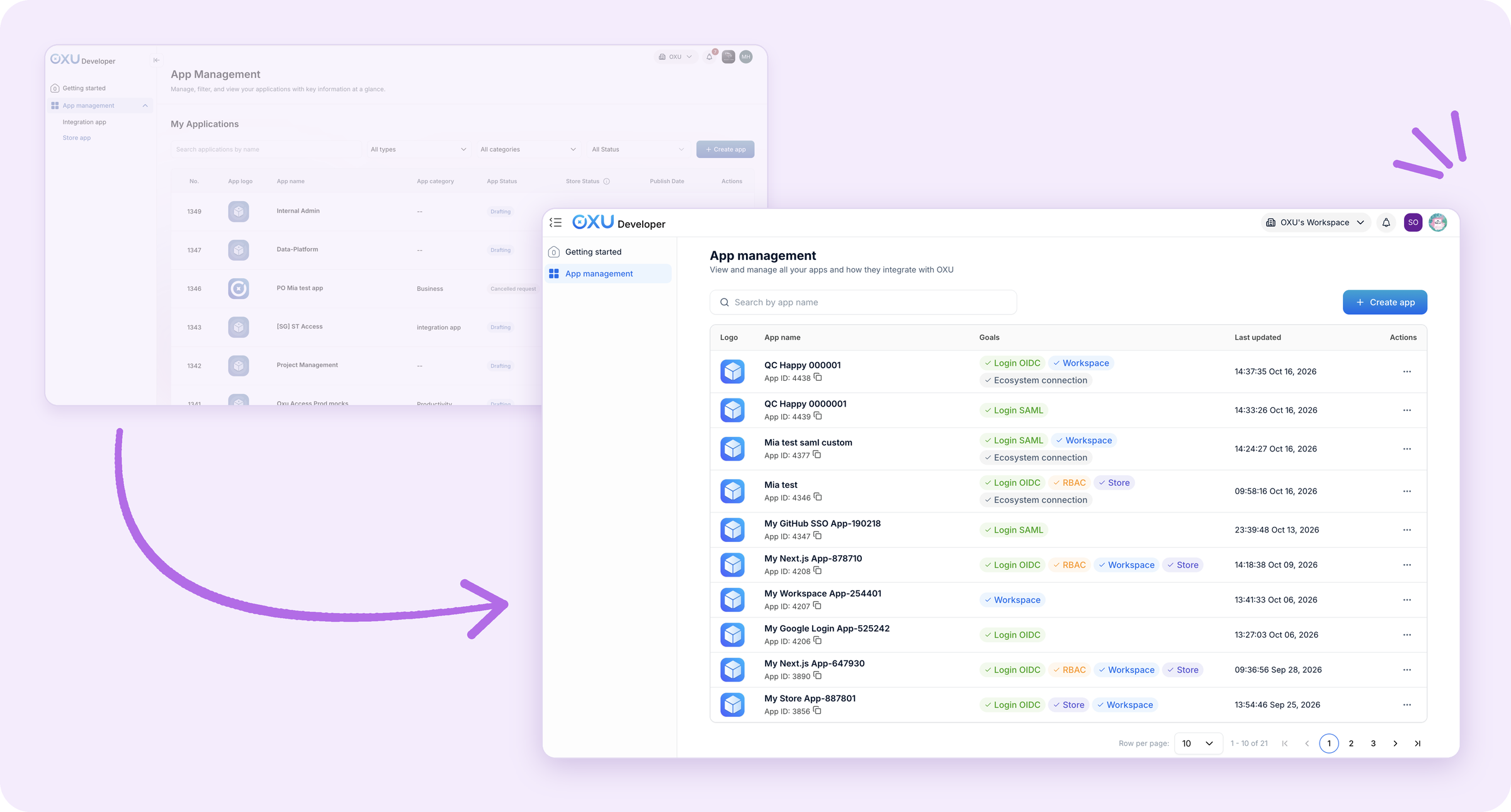
We've simplified application management by bringing Integration apps and Store apps together into a single App management page.
Previously, applications were organized into separate lists based on their type. With V2, you can manage them from one unified view.
What's improved?
- View all your applications in one place.
- Search for applications by name.
- Easily find and copy an App ID.
- Identify each application's integration capabilities through the new Goals column.
- See when an application was last updated.
The Goals column helps you quickly understand whether an application uses OIDC, SAML, RBAC, Workspace integration, Store publishing, or Ecosystem connection.
3. Explore multiple integration journeys within one app
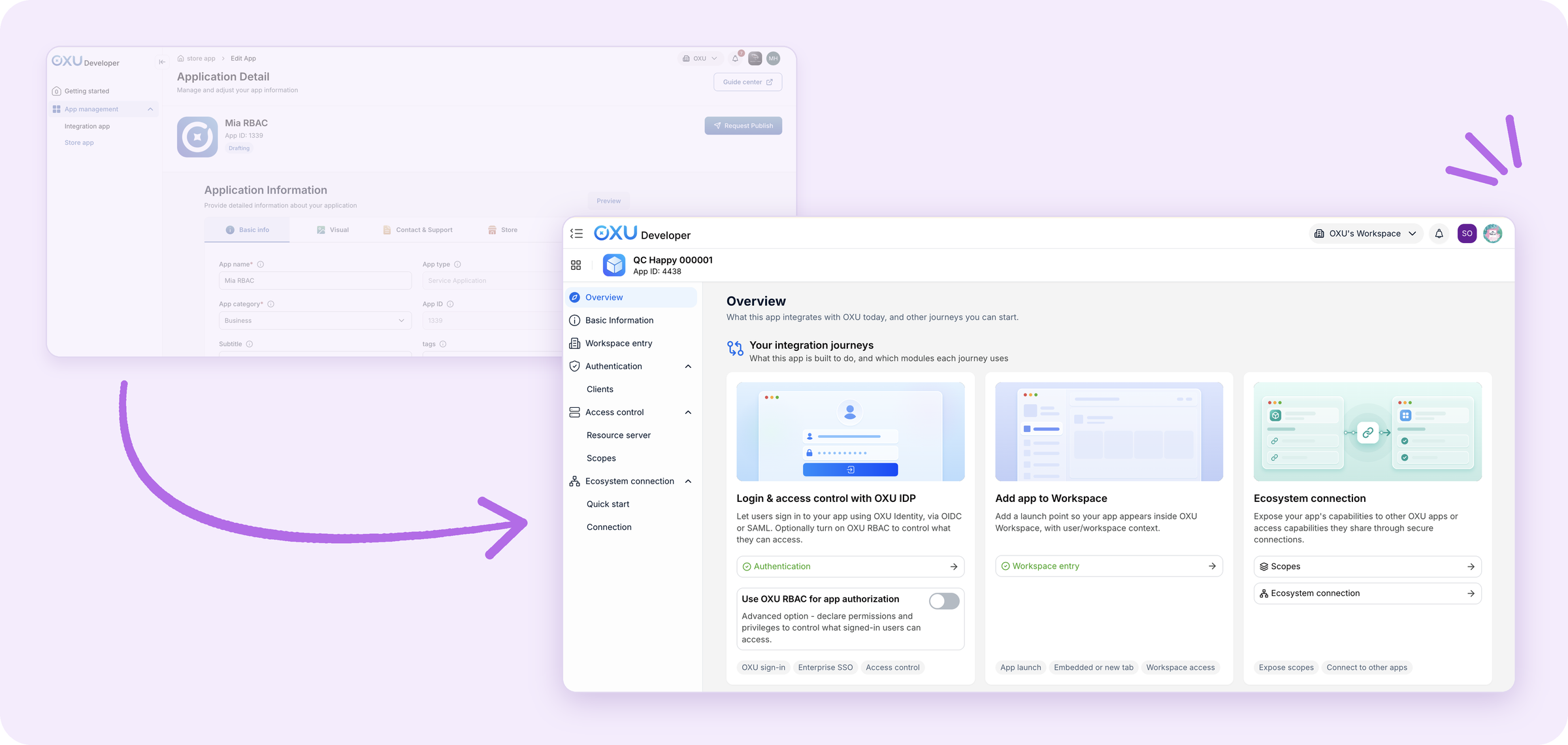
Your application is no longer limited to a single integration goal.
The new App Overview page gives you a clearer view of how your application is connected to the OXU ecosystem.
From this page, you can:
- View your application's existing integration journeys under Your integration journeys.
- Discover additional capabilities under Explore other journeys.
- Select Start this journey to begin setting up another integration.
- Access configuration modules from the application sidebar.
For example, an application that already supports OXU sign-in can also be configured for Workspace integration and Store publishing.
You don't need to start from a separate application type to explore these capabilities.
4. Bring your applications into OXU Workspace
Developer Portal V2 introduces a dedicated Add app to Workspace journey.
You can configure how your application is launched from OXU Workspace using one of two display modes:
| Display mode | Description |
|---|---|
| Embedded frame | Open your application within the OXU Workspace interface. |
| New tab | Launch your application in a separate browser tab. |
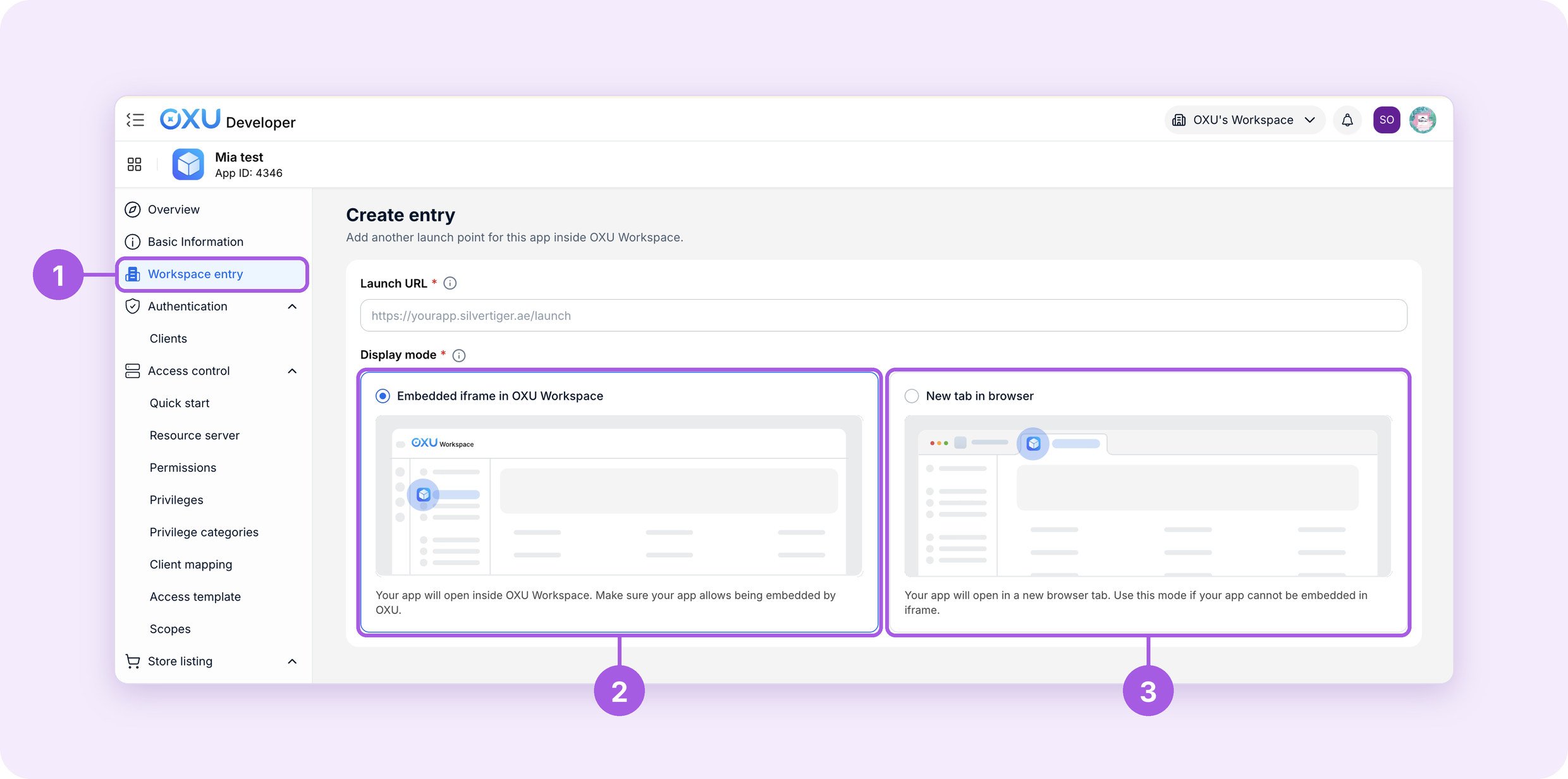
- Workspace entry in the sidebar, which is the new “Add app to Workspace” journey.
- Embedded iframe in OXU Workspace, which opens the app inside the OXU Workspace interface.
- New tab in browser, which opens the app in a separate browser tab.
This integration is designed for internal applications and business tools, including CRM, ERP, WMS, and other web applications.
5. Discover more integration capabilities
Developer Portal V2 also makes additional capabilities accessible through dedicated configuration modules.
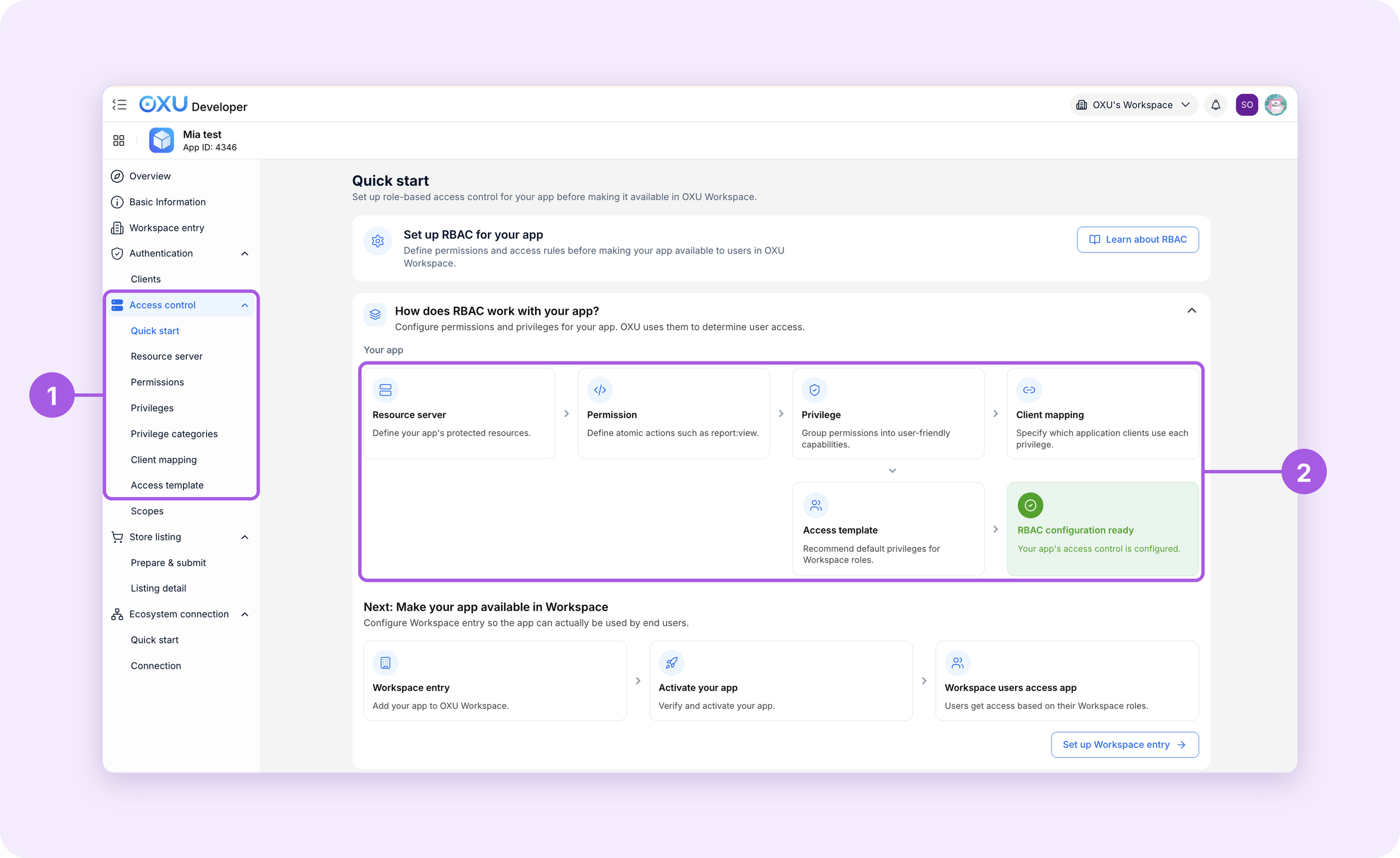
Access control (RBAC)
Configure application access using OXU RBAC, including resource servers, permissions, and related access configurations.
You can enable OXU RBAC from your application's Overview page when your application needs this capability.
Ecosystem connection
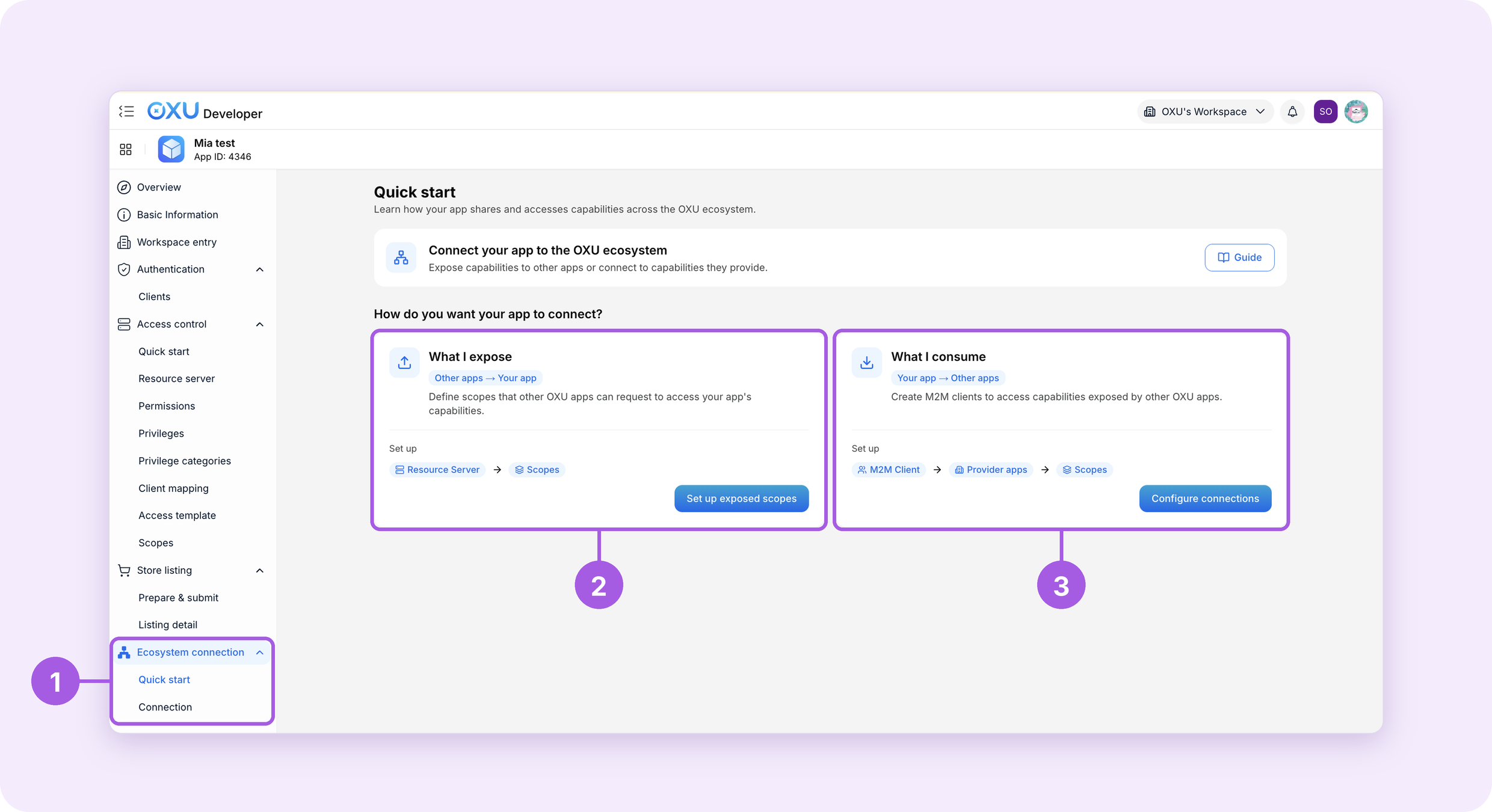
Connect your application with other applications in the OXU ecosystem.
With Ecosystem connection, you can expose supported capabilities through scopes and configure connections to capabilities provided by other OXU applications.
These features help you extend your application beyond a single integration use case.
What's changing from the previous Developer Portal?
We've reorganized several areas to make navigation more consistent and application management easier.
| Previous experience | New experience |
|---|---|
| Getting started based on OIDC, SAML, and Store publishing | Getting started based on integration goals |
| Separate Integration app and Store app lists | Unified App management |
| Application details organized around configuration forms | App Overview with integration journeys |
| Separate application types for different purposes | Multiple journeys within one application |
| OIDC/SAML configuration within existing application screens | Authentication module |
| Store-related configuration in application details | Publish to Store journey |
| No dedicated Workspace integration journey | Add app to Workspace journey |
Where can I find my existing applications and settings?
If you're familiar with the previous Developer Portal, here's where to look in V2.
| Looking for... | Go to... |
|---|---|
| Existing Integration apps | App management |
| Existing Store apps | App management |
| Application details | App management → Select an app → Overview |
| SAML/OIDC clients | App detail → Authentication → SAML/OIDC clients |
| Workspace launch configuration | App detail → Workspace entry |
| RBAC configuration | App detail → Access control |
| App-to-app connections | App detail → Ecosystem connection |
| Store publishing configuration | App detail → Store listing |
Some settings may appear in different locations, but the new navigation is designed to make each integration easier to find and manage.
Do I need to take any action?
You don't need to change how you navigate the Developer Portal until the new experience is released.
Once V2 becomes available, we recommend exploring the new Getting started and App management pages to get familiar with the updated navigation.
Important: Details about existing application configuration compatibility, credentials, and any migration requirements will be confirmed before the production release.
Frequently asked questions
Where are my Integration apps and Store apps?
Both application types are now organized under App management. You can use the Goals column to identify the integrations associated with each application.
Can I still use OIDC and SAML?
Yes. OIDC and SAML remain available as authentication methods. To get started, select Let users sign in with OXU, or choose an applicable quick-start option such as Google (OIDC) or GitHub (SAML).
Can I use multiple integration journeys for one application?
Yes. Open your application's Overview page and explore the available journeys under Explore other journeys.
Is OXU RBAC required for every application?
No. OXU RBAC is an optional capability that you can enable when your application needs access control configuration.
Can I make my existing application available in OXU Workspace?
Developer Portal V2 provides the Add app to Workspace journey, where you can configure how an application launches from OXU Workspace.
When will the new Developer Portal be available?
The release date will be announced once the production rollout schedule is confirmed.
Need help?
We're here to help you get familiar with the new Developer Portal.
Visit the OXU Support Center for guides and documentation, or contact the OXU support team if you need assistance.
Thank you for building with OXU. We're excited for you to explore the new Developer Portal experience!