
1. What you'll do
In this guide, you'll learn how to:
- Understand how application-to-application connections work in the OXU ecosystem.
- Expose your application's APIs for other applications to consume.
- Connect your application to APIs provided by other applications.
- Use M2M clients and access tokens to authenticate API requests.
- Understand how scopes control access to protected APIs.
- Get started with Ecosystem Connection in OXU Developer.
2. Why it matters
Applications often need to exchange data or access services provided by other applications.
OXU Ecosystem Connection helps developers establish secure application-to-application communication through a centralized integration model.
By using Ecosystem Connection, you can:
- Connect applications securely: Enable applications to communicate through authenticated API requests.
- Control API access: Define which API capabilities other applications can request and use.
- Manage credentials: Use M2M clients to authenticate application connections without requiring an interactive user sign-in.
- Support multiple connections: Configure separate M2M clients for different provider connections to keep credentials isolated.
- Build integrated solutions: Allow applications to share capabilities and exchange data within the OXU ecosystem.
3. How Ecosystem Connection works
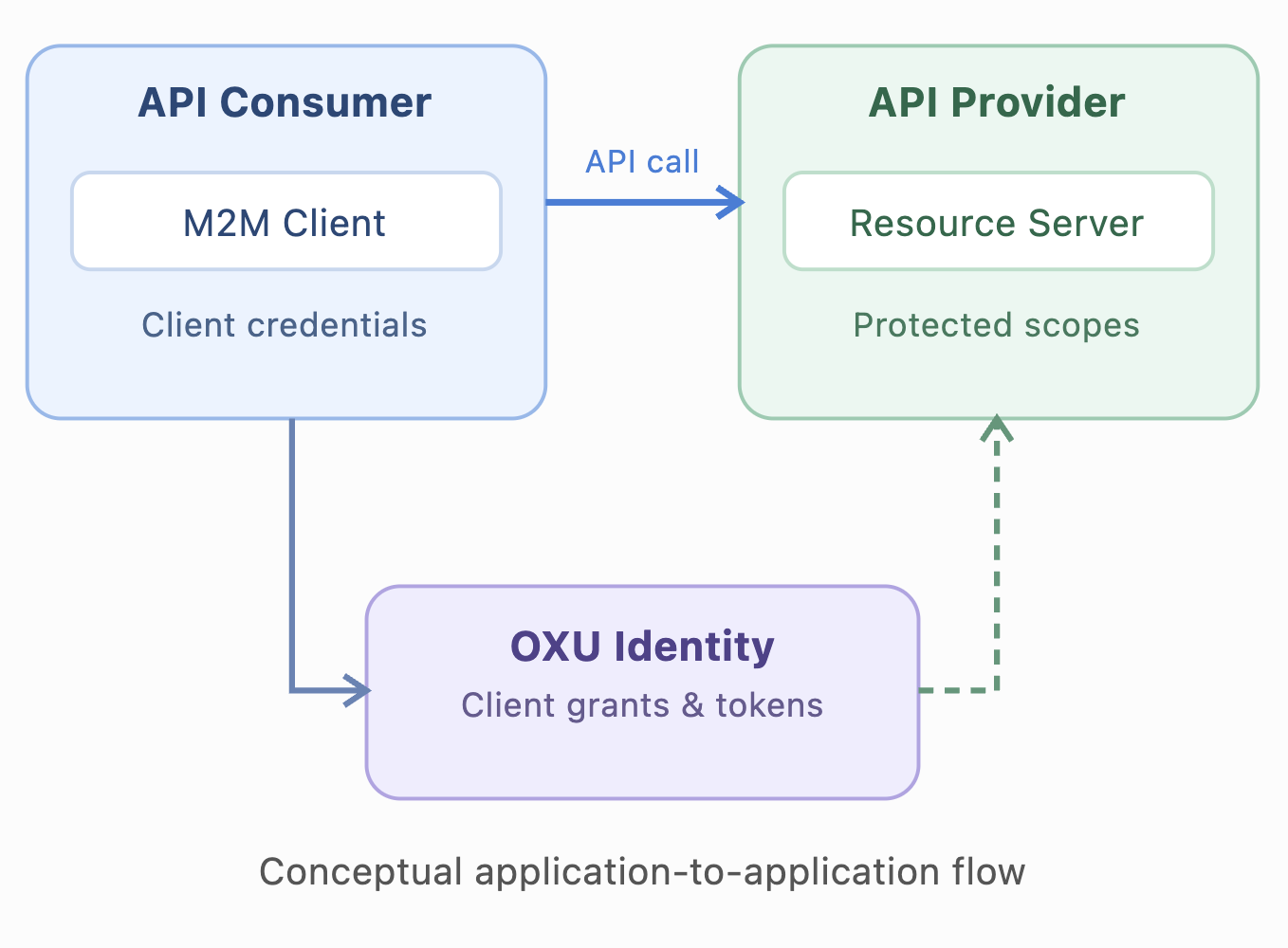
Ecosystem Connection allows applications to communicate through APIs using OAuth 2.0 authentication and authorization.
An application can play two roles:
- API Provider: Exposes APIs that other applications can access.
- API Consumer: Requests access to APIs exposed by other applications.
The same application can be both an API Provider and an API Consumer.
What I expose — Share your APIs
Use this capability when you want other applications to access APIs provided by your application.
As an API Provider, you can:
- Register the API or Resource Server you want to expose.
- Define scopes representing the API capabilities available to consumers.
- Configure which applications or clients are allowed to access those scopes.
- Validate access tokens and enforce the appropriate permissions when API requests are received.
Example:
A Reporting App exposes a reporting API with scopes such as:
reports:read— Allows authorized consumers to retrieve reports.reports:export— Allows authorized consumers to export reports.
Other applications can request these scopes, subject to the access rules configured for the API.
What I consume — Connect to other APIs
Use this capability when your application needs to access APIs provided by another application.
As an API Consumer, you can:
- Identify the API provider you want to connect to.
- Configure an M2M client for the connection.
- Request access to the required API scopes.
- Obtain an access token using the configured client credentials.
- Use the access token to call the provider's API.
Example:
An Analytics App needs reporting data from a Reporting App.
The Analytics App uses an M2M client to request an access token with the reports:read scope.
Once authorized, it can use the token to call the Reporting App's API and retrieve the permitted data.
4. Understand the key components
Ecosystem Connection uses several components to manage secure API communication.
| Component | Description |
|---|---|
| API Provider | An application that exposes APIs for other applications to access. |
| API Consumer | An application that requests and uses APIs exposed by a provider. |
| Resource Server | Represents an API or protected resource registered in OXU. |
| Scope | Defines a specific level of API access that a consumer can request. |
| M2M Client | Represents an application credential used for machine-to-machine authentication. |
| Client Grant | Defines which API scopes a client is authorized to request from a Resource Server. |
| Access Token | A credential issued through OAuth 2.0 that the consumer presents when accessing a protected API. |
How these components work together
- The API Provider registers its Resource Server and defines the scopes available to consumers.
- The API Consumer configures an M2M client.
- The provider or an authorized administrator grants the client access to selected scopes.
- The consumer authenticates using its client credentials and requests an access token.
- OXU Identity issues an access token according to the authorized scopes and token policy.
- The consumer sends the access token when calling the provider's API.
- The provider validates the token and enforces API access rules.
Important: An access token does not automatically grant unrestricted access to an API. The API Provider must validate the token and enforce the appropriate authorization rules.
5. Manage multiple API connections
An application may need to connect to multiple API providers.
OXU supports configuring multiple M2M clients within an application, allowing developers to separate credentials for different connections.
For example, an Analytics App may use:
| M2M Client | API Provider | Purpose |
|---|---|---|
| Reporting Client | Reporting App | Retrieve reporting data |
| Finance Client | Finance App | Retrieve financial information |
| Notification Client | Notification App | Send notifications |
Using separate M2M clients helps you:
- Manage credentials independently for each connection.
- Configure API access based on the needs of each integration.
- Rotate or revoke credentials for one connection without replacing credentials used by other clients.
- Reduce unnecessary sharing of credentials across integrations.
Note: Creating multiple M2M clients does not automatically grant API access. Each client must be authorized to access the required APIs and scopes.
6. Before you begin
Make sure you have:
- An active OXU account.
- Permission to create and manage applications in OXU Developer.
- An existing OXU application or permission to create one.
- A clear understanding of whether your application will expose APIs, consume APIs, or both.
If you want to expose APIs:
- Have an API or service ready to integrate.
- Identify the API capabilities you want to make available.
- Define the scopes consumers may request.
- Ensure your API can validate access tokens and enforce authorization rules.
If you want to consume APIs:
- Identify the API Provider you want to connect to.
- Know which APIs and scopes your application requires.
- Have permission to configure M2M clients.
- Ensure the required API access can be authorized by the provider or an authorized administrator.
7. Get started
Follow these steps to begin configuring Ecosystem Connection.
- Sign in to OXU Developer.
- Navigate to App management.
- Select an existing application or create a new one.
- Open Ecosystem connection in your application's configuration.
- Select the capability you want to configure:
- What I expose: Share your application's APIs with other applications.
- What I consume: Connect your application to APIs provided by other applications.
- Follow the guided setup to configure the required API resources, scopes, M2M clients, and authorization settings.
- Test the connection to verify that API requests are authenticated and authorized correctly.
You can configure both capabilities within the same application if needed.
8. What's next?
Continue with the following guides to complete your integration:
- Expose APIs to other apps: Register APIs, define scopes, and configure API access for consumers.
- Consume APIs from other apps: Connect your application to APIs provided by other applications.
- Configure M2M Clients: Create and manage credentials for application-to-application connections.
- Manage Scopes & API Access: Control which scopes clients are authorized to request.
- Test app-to-app connection: Verify access token requests, API authentication, and authorization behavior.
Related guides:
- Authentication & SSO: Learn how to authenticate end users with OXU Identity.
- Access Control (RBAC): Learn how to configure permissions and privileges for your application's authorization model.
Ecosystem Connection focuses on application-to-application communication, while Authentication & SSO focuses on user authentication.